Overthinking the txt files
YOU (DON'T) NEED NOTION
God, I have been trying to write this post for a long time in my life. I hate being disorganized. It always feels like you are wearing nothing but an extremely itchy sweater, and your task is to set up the live fuse box. So I've been looking for an efficient, practical, and low-effort way to keep my shit up. I've been using it all: Notion, Logseq, QOwnNotes - it all is a steaming pile of shit for my tasks. Why? Because never believe people on the WWW, they are going to sell you shit! (Unless their CMS blog is made in POSIX shell and all they do is complain about software and share their shell scripts). So let's start with actually stating the problem.
I need a way to organize my work tasks and leave searchable contextual breadcrumbs: notes, code snippets, instructions
Alright, now I think we can make some edgy name for this thing. I am
calling it todo. (badass, isn't it?). So as I said, such a system
should:
- Be a daily task tracker
- Store small notes on those tasks
- Be simple: easy to maintain, plaintext, local-first
- Be searchable
My initial research focused on 2 things: using ordinary markdown lists and todo.txt{target="_blank"}. Both are totally fine for some of you on their own, but I hated a consistent set of things in both of them.
Markdown [M↓]
Honestly, there's nothing wrong with it. Great format, love it paired with Pandoc{target="_blank"}. But for a full-time task management format, I don't like one particular element about it:
- [X] I don't like that little dash in the beginning of the line
- [ ] And I don't like that it only allows ` ` or `X`, which makes sense as an
      HTML checkbox, but does not as a task entry in my todo format
      But let\'s **keep this option** - other than that, it is a very good
      candidate.
todo.txt
Oh boy, I have some things to tell. Intentionally a simple format feels like someone was asking themselves what is the most awkward, verbose, and annoying way to manage tasks. The answer awaits you below:
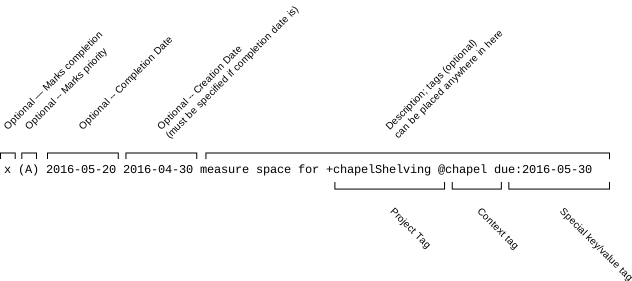
Seriously, 8 groups? You remember my nitpick on the - in the Markdown,
right? Also another problem I don't exactly understand why you are
supposed to mix different projects in one list. This mix of contexts is
not going to be helpful at all, and for me having this whole system of
hashtags and projects is just as confusing, like mixing actual tables
with a tablespoon. The only good thing about todo.txt is that now I know
how exactly I don't see my system.
todo format
Alright, now I need to stop making fun of people and suggest a solution that works for me. Here it goes:
[STATUS] TASK: PROJECT ID
[1-N] TASK: DONE N TIMES
[C] TASK: CURRENT
[T] TASK: TODO
[A] TASK: ATTENTION
[X] TASK: FAILED
Well... Yeah, this is literally it. I think I need to get into the
concept behind this status code system I fgured out for myself. As I
said, I felt really inspired my Markdown checkboxes, but felt that just
having X is very limiting; I should add more! And I was following the
convention many people know - introducing . for in-progress tasks! But
then, obviously, I also need to note tasks where I had problems, or some
tasks required attention, and some were just repetitive, and I wanted to
record that as well. This is how I came up with a very cryptic set of
symbols like the question mark, exclamation mark, comma, and numbers for
repeated tasks. But then I found out in my text editor that I can sort
lines. I was thinking, this is very stupid; who in their life would have
such a need to sort lines in a file, maybe some freak who tracks their
tasks in a very sortable and convenient plaintext way, like me... So
the whole system was redesigned from scratch to be actually sortable and
easy to decode. I came up with the idea that A is awesome for urgent
tasks, because it comes right after tasks you finished, as the first
one, and it is a very good way to remind yourself, because it even comes
up before the current task! And for failed, I feel like in the
productivity field, we neglect mistakes and errors, and this is very
crucial, as, for example, in aviation, every error or accident is
investigated
and then all the instructions are being updated in the world so nobody
would ever have similar problems, or will have at least a good checklist
on what to do in such a case.
Alright, cowboy, but where are the notes?
Down below! They are intentionally simple, and I just prefer to have 2 rules about them:
[HH:MM]before the note is pretty and functional- add a lowercase space-delimited cloud of appropriate tags so your
note is
grep(1)-friendly
With plain text files, I don't have this fear of an empty canvas, I
don't bother myself with the unnecessary structure, how it is going to
affect my knowledge graph, my database, my tags. I write what happened
in this brutally minimal document with useful keywords, and then grep
it when I need it. Removing redundancies in this problem is extremely
important to stay productive and in the flow
Honestly, I think that here might be the best way to end the post, but I
also want to show off my beautiful script, and some other little
observations I have after a year of using this todo system.
#!/bin/sh

todo() {
    _dir="$HOME/todo"
    _archive="$HOME/archive/todo"
    _today="$(date +%Y-%m-%d)"
    _file="$_dir/$_today.txt"

    mkdir -p "$_dir" "$_archive"
    for f in "$_dir"/????-??-??.txt; do
        [ -e "$f" ] || continue
        [ "$f" = "$_file" ] && continue
        mv -n "$f" "$_archive/$(basename "$f")"
    done

    [ -f "$_file" ] || printf "## %s\n\n\n\n## log\n\n\n" "$_today" > "$_file"
    set -- "$_file"
    unset _dir _archive _today _file f
    "${EDITOR:-vi}" "$1"
}

todo
A little disclaimer: this is a POSIX script, and it
- Expects that you have your favorite
$EDITORset in your.*rcfile - Archives your stuff in the todo folder each run (I hope this is very KISS for you too, because I don't mind)
- And call me a bloatlord, but I just keep that function in my
.bashrc, but you can certainly Just have it in your scripts pile or whatever
This script is not solving a generalized problem of task management, it just manages some of your files the simplest way possible, and if this doesn't fit your workflow - that is perfectly fine. The message I wanted to provide through my frustration and experience is that you should allow yourself build tools that don't have to be universal and extensible. The just have to survive your workday. Personal computers were always about making personal helpers. Don't misuse your PC :D